
Hit stop.The rest is handled.
Transcription with automatic speaker labels, show notes written from the transcript, sponsor reads in your cloned voice, and royalty-free intro music. Everything after the recording, in one account on one credit balance.
Post-production is the part that eats the week
Recording an episode takes an hour. Turning it into a transcript, show notes, chapter markers, three social clips and a sponsor read takes far longer, and it usually means a transcription service, a TTS tool, a music library and an audio editor with four separate bills. faktry runs all of it from the same file you just uploaded, and every output lands in one library ready for the next step.
The podcaster toolkit
The operations that replace your transcription service, music library, TTS tool and audio editor.
From recording to text
Transcription with speaker labels
Transcribe with Whisper-1 or ElevenLabs Scribe v2, which identifies and labels each speaker automatically. Export as plain text, SRT, VTT or timestamped JSON. A 60-minute interview finishes in a couple of minutes.
Voice cloning
Clone your voice from a short sample, then generate sponsor reads, teasers and narration in it. Consistent branding across episodes without re-recording every segment by hand.
Intro and outro music
Generate royalty-free instrumentals mood-matched to a text prompt, or full tracks with vocals. No licensing fees and no attribution requirements for commercial use.
From text to published content
Show notes and written content
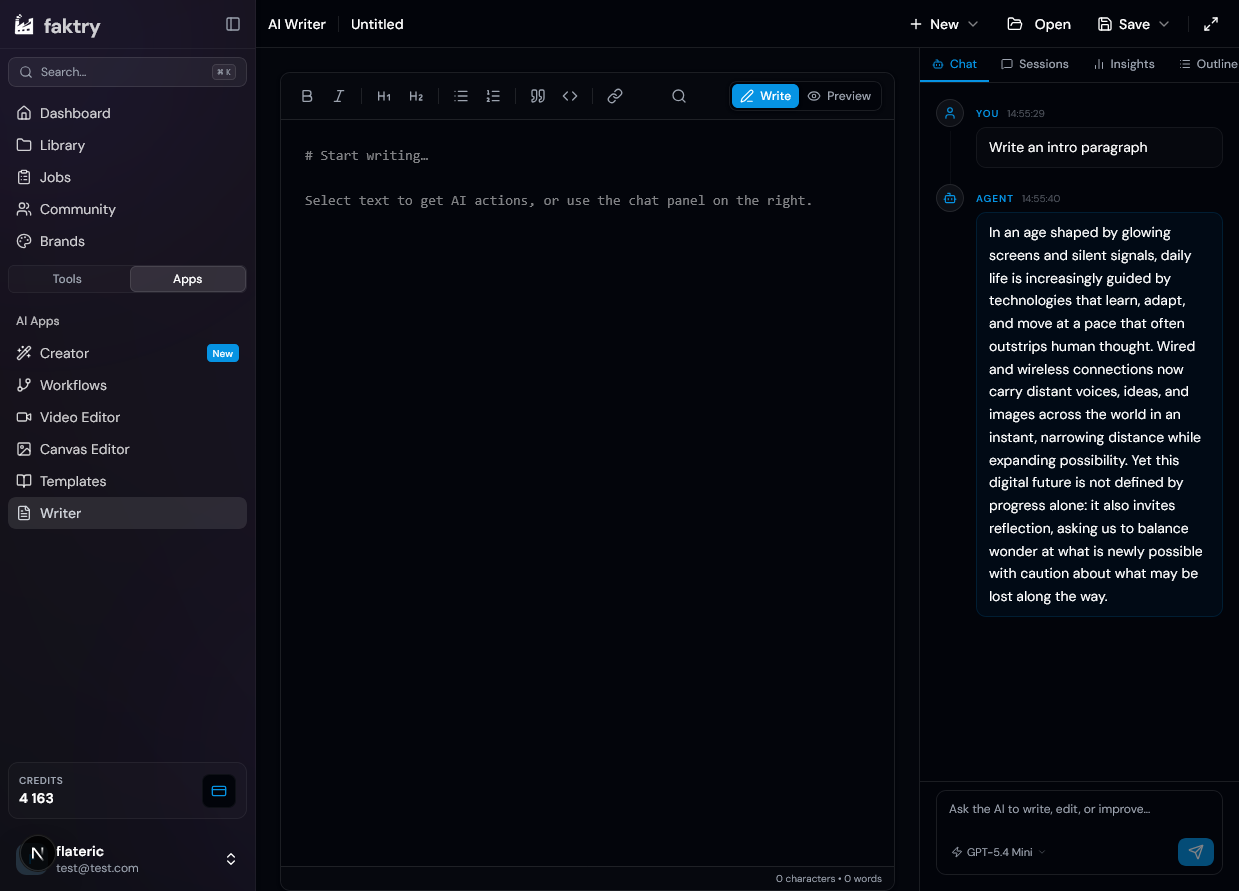
Feed the transcript to the AI Writer and get structured show notes, chapter timestamps, an episode summary, social posts and a full blog post. No copy-paste from the transcript.
Audio sourcing
Pull audio directly from YouTube, SoundCloud, Vimeo or Bandcamp. Useful for guest clips, reference tracks and archiving your own published episodes for highlight reels.
Audio editing and export
Convert between MP3, WAV, OGG, AAC and M4A, mix multiple tracks, trim and merge segments. The traditional editing steps live next to the AI ones instead of in a separate app.
The models behind the workflow
Swap models from a dropdown. Same credit balance, no separate provider accounts.
Voice and music
Transcription, text-to-speech, voice cloning and music generation
 ElevenLabs
 OpenAI TTS
 Gemini TTS
 MiniMax Music
Cover art and clips
Episode artwork, audiogram backgrounds and social images




The podcast post-production pipeline
What faktry handles after you stop recording.
Source and prepare
Download reference audio and guest clips from YouTube or SoundCloud, trim to the segments you need, merge into one file, and convert to the format your editor expects.
Transcribe the episode
Upload the raw recording and transcribe with Scribe v2. Speaker labels identify each guest automatically. Export SRT for the video version or plain text for everything downstream.
Turn the transcript into content
One transcript becomes show notes, chapter markers, an episode summary, a newsletter section and a set of social posts, all generated in the AI Writer and editable inline.
Cut the video version
Generate cover art and audiogram backgrounds, burn in subtitles from the SRT you already have, and export vertical clips sized for Shorts, Reels and TikTok.
Capabilities at a glance
What a podcast account actually touches across the platform.
Transcription
- Whisper-1
- ElevenLabs Scribe v2
- Speaker labels
- Timestamped export
Voice
- Voice cloning
- ElevenLabs v3
- Gemini TTS
- OpenAI TTS
Music
- Instrumentals
- Full tracks
- Sound effects
- Royalty-free
Editing
- Trim and merge
- Multi-track mix
- Format convert
- Audio download
Pay for the episodes you actually make
Credits instead of four monthly subscriptions. A quiet month costs nothing.
Included on every account
Podcaster questions
Can it tell my guests apart in a multi-person interview?
Yes. ElevenLabs Scribe v2 performs speaker diarization, so the transcript is segmented and labelled per speaker automatically. You rename the labels once and the whole transcript updates.
How long does a full episode take to transcribe?
A 60-minute interview typically finishes in under two minutes. You upload the file, pick the model, and the result lands in your content library as text plus whichever subtitle formats you selected.
Can I generate show notes without copy-pasting the transcript?
Yes. The transcript is already in your library, so the AI Writer reads it directly. One pass produces show notes, chapter timestamps, a summary and social posts, and you edit them inline before exporting.
Is the generated intro music actually free to use commercially?
Yes. Music you generate carries no extra licensing fee from faktry and can be used commercially, subject to our Terms and the music model provider's usage policy. That applies to instrumentals, full tracks with vocals, and sound effects.
How good does a cloned voice need to sound for sponsor reads?
Cloning works from a short reference sample and is intended for sponsor reads, teasers and narration rather than replacing a full hosted episode. Most podcasters use it for the repetitive segments that would otherwise mean another recording session.
Can I pull audio from YouTube or SoundCloud for guest clips?
Yes. The audio download operation handles YouTube, SoundCloud, Vimeo and Bandcamp, so you do not need a separate downloader for reference tracks, guest clips or archiving your own published episodes.
What do I need for the video version of an episode?
The SRT you exported during transcription burns straight into a video, and the video operations cover vertical resize, clip trimming, thumbnail sheets and frame export. Cover art and audiogram backgrounds come from the image models.
Do I need separate accounts for OpenAI and ElevenLabs?
No. Everything routes through the faktry gateway on one credit balance. There is no provider account to create, no API key to store and no second invoice to reconcile.
Explore the platform
The features and use cases next to this one.